
Description
This case study is an independent architecture design exercise developed to demonstrate cloud-native End-User Computing (EUC) architecture methodology for hybrid workforce environments. It was not associated with a production deployment. The scenario is based on the remote access, security governance, and user experience requirements typical of organisations transitioning from legacy VPN and on-premises VDI infrastructure toward cloud-native virtual desktop delivery.
This case study is an independent architecture design exercise developed to demonstrate cloud-native End-User Computing (EUC) architecture methodology for hybrid workforce environments. It was not associated with a production deployment. The scenario is based on the remote access, security governance, and user experience requirements typical of organisations transitioning from legacy VPN and on-premises VDI infrastructure toward cloud-native virtual desktop delivery.
Key Focus Areas:
Azure Virtual Desktop Architecture
Identity & Endpoint Governance
Secure Remote Workforce Enablement
Cloud-Native EUC & Profile Management
FSLogix Profile Architecture
BYOD & Managed Device Security
Executive Summary
Architected a cloud-native End-User Computing (EUC) platform based on Azure Virtual Desktop (AVD) to support secure, scalable, and identity-driven hybrid workforce operations across managed and BYOD device environments.
The architecture integrates Azure Virtual Desktop pooled and personal host pools, Microsoft Entra ID Conditional Access, Microsoft Intune device compliance, FSLogix profile containers on Azure Files Premium, AVD Autoscale for cost optimisation, Microsoft Defender for Endpoint session protection, and Terraform-based infrastructure automation — delivering persistent user experiences, centralised governance, and Zero Trust-aligned security controls.
The design demonstrates how legacy VPN and on-premises VDI approaches can be modernised through cloud-native desktop delivery — improving scalability, security governance, and user experience consistency while reducing infrastructure operational overhead.
Business Drivers
The transition toward hybrid and remote work exposed fundamental limitations in legacy remote access architectures. Traditional VPN connectivity provides network-level access without workload isolation or consistent user experience. On-premises VDI environments require significant infrastructure investment, lack elastic scalability, and create operational overhead that scales poorly with workforce size fluctuations.
This architecture was designed to address the EUC requirements of organisations where existing approaches result in:
Inconsistent user experiences across devices and locations — session state lost between logoffs, profile corruption causing support incidents
Limited scalability during demand peaks — on-premises VDI capacity constraints preventing rapid workforce expansion or contraction
Security risks from unmanaged BYOD devices accessing enterprise resources through VPN without device health validation
High operational overhead for on-premises VDI infrastructure maintenance — hypervisor patching, storage management, and capacity planning
Complex user profile management — roaming profiles and folder redirection creating performance issues and corruption risk at scale
Inability to enforce consistent security policy across managed corporate and unmanaged personal devices accessing enterprise resources
Operational Constraints
The architecture was designed to operate within the following constraints typical of hybrid workforce EUC environments:
Users require secure access from both managed corporate devices and unmanaged personal BYOD devices — with differentiated security controls per device category
User experience must remain consistent across multiple sessions, devices, and geographic locations — profile state must persist between logoffs
Desktop infrastructure must scale elastically with workforce demand — peak capacity cannot be permanently provisioned for cost reasons
Security controls must enforce centralised identity and device compliance without requiring on-premises domain join for session hosts
User profile management must deliver fast session logon times — profile load latency directly impacts user experience and support volume
Operational management overhead must be reduced compared to on-premises VDI — cloud-native management without per-VM infrastructure operations
Infrastructure deployment must be repeatable and consistent — manual portal-based deployment creates configuration drift across session host pools
Objectives
Design a scalable pooled AVD host pool architecture supporting concurrent hybrid workforce users across managed and BYOD devices
Implement identity-driven Zero Trust access controls through Conditional Access with differentiated policies per device category
Deliver persistent user profile experiences through FSLogix profile containers on Azure Files Premium storage
Implement AVD Autoscale for cost-optimised session host scaling based on demand schedules and active session thresholds
Enforce device compliance through Microsoft Intune for managed devices and session-level security controls for BYOD
Integrate Microsoft Defender for Endpoint for endpoint protection and threat visibility within AVD sessions
Automate infrastructure deployment through Terraform ensuring consistent, repeatable session host provisioning
Centralise operational monitoring through Azure Monitor and Log Analytics for session health, profile performance, and user activity visibility
Architecture Principles
Identity-first access governance — authentication and device state evaluated at every session initiation regardless of network location
Cloud-native desktop delivery — no on-premises VDI infrastructure dependencies for session host management
Persistent user experience abstraction — user profile state independent of which session host serves the connection
Elastic scalability — session host capacity adapts to demand without manual intervention through Autoscale
Device-aware security enforcement — managed and BYOD devices receive differentiated access controls appropriate to their compliance posture
Separation of control and compute planes — AVD control plane (Microsoft-managed) and session host compute (customer-managed) operate independently
Infrastructure automation — all session host provisioning defined as Terraform code, not manual portal configuration
Centralised observability — session performance, profile health, and security events unified in Azure Monitor
Architecture Overview
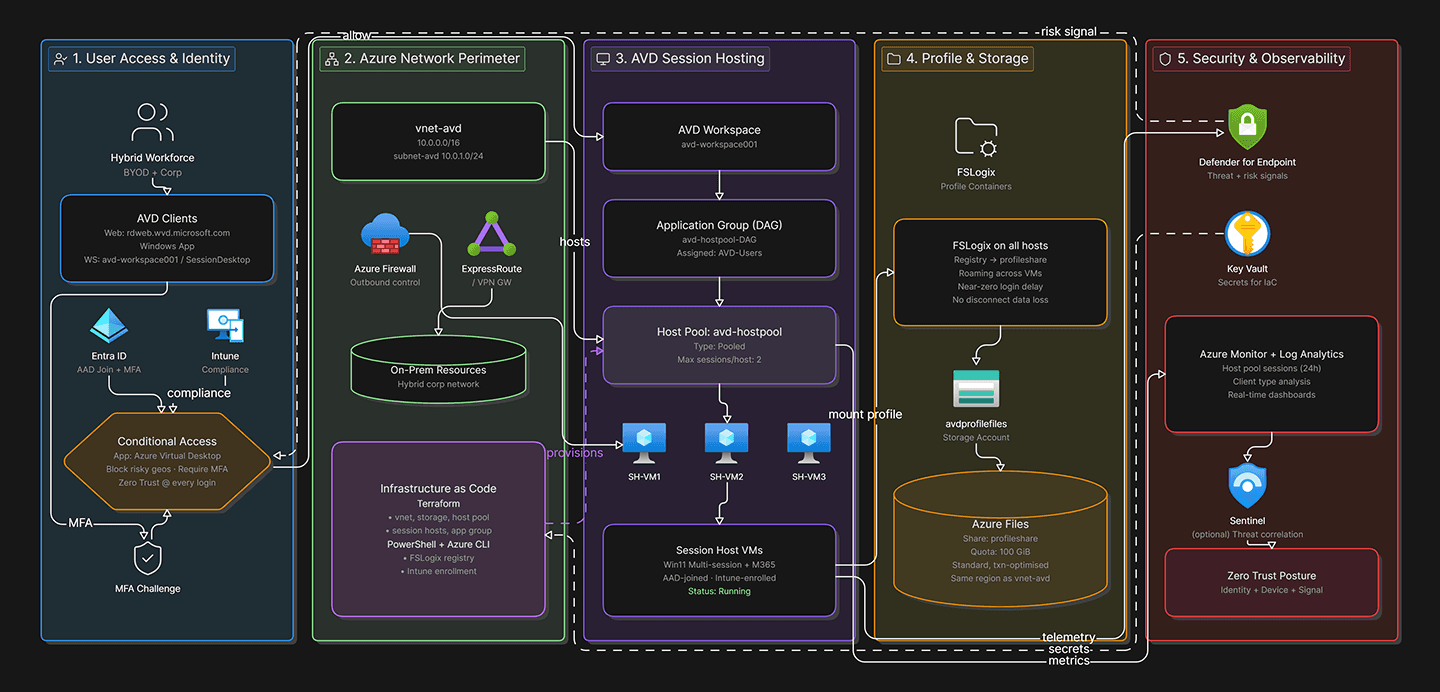
The solution is structured as a seven-layer cloud-native virtual desktop platform integrating access governance, compute, profile management, identity and device management, security, networking, and observability.
1. Access Layer
The access layer provides identity-verified, policy-governed user connectivity into Azure Virtual Desktop environments across all device categories.
Client Access Options:
AVD Windows client — optimal performance for managed corporate Windows devices
AVD macOS client — managed macOS device access
AVD Web client (browser-based) — BYOD and unmanaged device access without client installation requirement
AVD mobile clients (iOS, Android) — mobile workforce access scenarios
Authentication and Access Governance:
Microsoft Entra ID authentication required for all session initiations — no anonymous or unauthenticated access paths
Conditional Access policy evaluation at every authentication event — session initiation blocked if policy conditions are not satisfied
MFA enforcement for all users regardless of device category or network location
BYOD vs Managed Device Access Model:
Access Scenario | Device Category | Conditional Access Policy | Session Restrictions |
|---|---|---|---|
Corporate managed device | Intune compliant | Require MFA + compliant device | Full desktop access |
Hybrid Azure AD joined device | Domain-joined + compliant | Require MFA + hybrid joined | Full desktop access |
Personal BYOD device | Unmanaged | Require MFA + session controls | Restricted — clipboard, printing, drive redirection disabled |
Unmanaged high-risk sign-in | Any | Block access | No session granted |
BYOD devices accessing AVD through the web client receive restricted sessions with clipboard redirection, local drive mapping, and printing disabled — preventing data exfiltration through unmanaged device interfaces while still enabling productive remote work access.
2. Compute Layer
The compute layer leverages Azure Virtual Desktop session hosts organised into host pools — the scalable, multi-user compute foundation of the platform.
Host Pool Architecture:
Pool Type | Use Case | Scaling Model | User Assignment |
|---|---|---|---|
Pooled — Breadth-first | Standard knowledge workers | Autoscale | Dynamic — any available host |
Pooled — Depth-first | High-concurrency, cost-optimised | Autoscale | Dynamic — fill hosts before starting new |
Personal | Power users, developers, specialised workloads | Manual or Autoscale | Static — dedicated host per user |
Session Host Configuration:
Multi-session Windows 11 Enterprise for Virtual Desktops — optimised for concurrent user workloads
VM SKU selection based on workload profile — Standard D-series for standard knowledge workers, higher memory SKUs for data-intensive workloads
Azure Availability Zones distribution for session host resilience — hosts distributed across zones preventing zone-level failures from impacting all sessions simultaneously
Golden image management through Azure Compute Gallery — standardised session host images with security baselines applied, versioned and promoted through development → staging → production
AVD Autoscale: AVD Autoscale manages session host power state based on demand schedules and active session thresholds — a critical cost optimisation capability for cloud-native VDI that on-premises infrastructure cannot replicate.
Autoscale Parameter | Configuration | Purpose |
|---|---|---|
Peak hours schedule | Business hours (08:00–18:00) | Maintain capacity for expected peak demand |
Off-peak schedule | Evenings and weekends | Drain and deallocate idle hosts |
Minimum hosts | 2 always-on hosts | Ensure immediate availability for first users |
Scale-out threshold | 80% session capacity | Start new hosts before capacity exhaustion |
Scale-in threshold | 20% session utilisation | Drain and deallocate underutilised hosts |
Autoscale reduces AVD compute costs significantly during off-peak hours by deallocating idle session hosts — paying only for active compute rather than always-on capacity.
3. Profile Management Layer
Persistent profile management is implemented through FSLogix profile containers stored on Azure Files Premium — the architectural component most directly responsible for user experience consistency across sessions.
FSLogix Profile Container Architecture:
FSLogix redirects the entire Windows user profile into a VHD/VHDX container file stored on Azure Files — the container is mounted as a local disk at session logon, providing native-speed profile access without the latency and corruption risk of traditional roaming profiles.
FSLogix Component | Configuration | Rationale |
|---|---|---|
Profile Container | VHDX format, dynamic sizing | Full profile persistence across all session hosts |
Office Container | Separate VHDX for Office data | Isolates large Office cache files from profile container |
Container storage | Azure Files Premium (SSD-backed) | Sub-100ms profile mount times — critical for user experience |
Concurrent session handling | Enabled — read-write primary, read-only secondary | Allows simultaneous multi-session access to profile |
Cloud cache | Enabled | Local container cache reducing Azure Files dependency during session |
Why Azure Files Premium over Standard: Azure Files Standard tier uses HDD-backed storage with higher latency — acceptable for file share workloads but creating noticeable profile mount delays in VDI environments. Premium tier (SSD-backed) delivers consistent sub-100ms IOPS that FSLogix requires for fast session logon times. The cost premium for Premium tier is justified by the direct user experience impact — slow profile mounts are among the most common AVD support complaints.
Profile Storage Architecture:
Separate Azure Files shares per host pool — preventing profile storage issues in one pool from affecting others
Azure Files share with identity-based access through Active Directory or Entra ID — users can only access their own profile containers
Share-level permissions restricting FSLogix service account to the minimum required access scope
Azure Backup protection for Azure Files shares — profile data protected against accidental deletion or storage corruption
4. Identity & Device Management Layer
Identity governance and device compliance controls leverage cloud-native Microsoft management services — replacing traditional on-premises Active Directory domain join requirements for session hosts.
Microsoft Entra ID — Cloud Identity Foundation:
Azure AD Join for session hosts — no on-premises Active Directory dependency for session host management
Entra ID as the authoritative identity source for all AVD authentication events
Hybrid identity integration through Entra Connect where on-premises AD remains the authoritative user directory
Microsoft Intune — Device Compliance Enforcement:
Device compliance policies defining minimum security requirements for managed corporate devices
Compliance requirements enforced through Conditional Access — non-compliant managed devices cannot initiate AVD sessions
Intune configuration profiles applying security baselines and application policies to enrolled corporate devices
Intune enrollment enforcement — corporate devices required to be Intune-enrolled before AVD access is granted
Device Compliance Requirements for Managed Devices:
Compliance Requirement | Policy Setting | Enforcement |
|---|---|---|
OS minimum version | Windows 11 22H2+ | Conditional Access block if non-compliant |
BitLocker encryption | Required | Conditional Access block if non-compliant |
Antivirus | Defender or approved AV | Conditional Access block if non-compliant |
Firewall | Enabled | Conditional Access block if non-compliant |
Secure Boot | Required | Conditional Access block if non-compliant |
5. Security Layer
The security layer integrates identity-driven controls and endpoint protection — enforcing Zero Trust principles across both session access and in-session activity.
Conditional Access — Session Security Enforcement:
MFA required for all AVD session initiations regardless of device category or network location
Device compliance validation — managed devices must satisfy Intune compliance policies before session access
Sign-in risk policy — high-risk sign-ins blocked regardless of device compliance status
Session controls for BYOD — restricted sessions disabling clipboard, printing, and local drive redirection for unmanaged devices
Microsoft Defender for Endpoint — Session Protection:
Defender for Endpoint deployed on all AVD session hosts through Intune policy
Real-time threat detection within active user sessions
Endpoint Detection and Response (EDR) providing investigation capability for session-level security incidents
Integration with Microsoft Sentinel for session-level security telemetry correlation
Role-Based Access Control:
AVD Application Group assignments controlling which users access which published desktops and applications
Least-privilege RBAC — AVD administrators scoped to AVD resource management without broader subscription access
Session host local administrator access restricted — users operate as standard users within sessions
6. Networking Layer
The networking architecture provides isolated, secure connectivity for AVD session hosts with controlled access to enterprise resources.
VNet Architecture:
Dedicated Azure VNet for AVD session host subnets — isolated from other Azure workload networks
Network Security Groups restricting inbound connectivity to AVD control plane service tags only — no direct user-to-session-host connectivity required
Private endpoints for Azure Files profile storage — profile container traffic remains on Azure private network without public internet exposure
Hybrid Connectivity Options:
Azure VPN Gateway or ExpressRoute for session host access to on-premises enterprise resources (file servers, internal applications, domain controllers for hybrid identity scenarios)
Azure Firewall optional integration for session host outbound internet traffic governance and URL filtering
AVD Control Plane Connectivity: AVD session hosts require outbound connectivity to Microsoft AVD control plane service endpoints — these are Microsoft-managed and do not require inbound public connectivity to session hosts. Users connect to sessions through the AVD gateway service rather than directly to session host IP addresses.
7. Observability Layer
Centralised monitoring provides operational visibility across session health, profile performance, user activity, and infrastructure utilisation.
Azure Monitor & AVD Insights:
AVD Insights workbook providing pre-built dashboards for session host health, connection reliability, and user experience metrics
Session host CPU, memory, and disk utilisation monitoring — identifying hosts requiring right-sizing adjustment
Connection diagnostics — latency, bandwidth, and round-trip time monitoring per user session
Logon time analysis — identifying slow profile mounts, Group Policy processing delays, and application load time issues
Log Analytics — Telemetry Aggregation:
AVD diagnostic settings forwarding connection, host registration, and management activity logs to Log Analytics
FSLogix event log collection for profile mount success/failure analysis and troubleshooting
Alert rules for session host health failures, profile mount errors, and Autoscale events
User Activity Visibility:
Session initiation and termination logging for audit and compliance purposes
Application usage tracking within published application groups
Defender for Endpoint integration providing security event correlation within user sessions
Technologies Used
Category | Technologies |
|---|---|
Virtual Desktop Platform | Azure Virtual Desktop (AVD) |
Identity & Access Management | Microsoft Entra ID, Conditional Access, MFA |
Device Management | Microsoft Intune |
Profile Management | FSLogix, Azure Files Premium |
Security & Endpoint Protection | Microsoft Defender for Endpoint, Azure RBAC |
Autoscaling | AVD Autoscale |
Networking | Azure VNet, NSGs, Private Endpoints, Azure Firewall (optional) |
Monitoring & Observability | Azure Monitor, Log Analytics, AVD Insights |
Infrastructure Automation | Terraform, PowerShell, Azure CLI |
Image Management | Azure Compute Gallery |
Key Challenges Addressed
Securing access from unmanaged BYOD devices — addressed through differentiated Conditional Access policies applying session-level controls (clipboard, printing, drive redirection disabled) for unmanaged devices — enabling productive access without data exfiltration risk through uncontrolled device interfaces.
Maintaining persistent user experience consistency across sessions — addressed through FSLogix VHDX profile containers on Azure Files Premium — the container mounts as a local disk at logon providing native-speed profile access regardless of which session host serves the connection.
Managing user profile performance and reliability — addressed through Azure Files Premium SSD-backed storage providing sub-100ms IOPS for FSLogix container operations, Office Container separation preventing large cache files from bloating profile containers, and Cloud Cache providing local container resilience against Azure Files connectivity interruptions.
Scaling virtual desktop infrastructure dynamically — addressed through AVD Autoscale managing session host power state based on demand schedules and active session thresholds — eliminating manual capacity management and reducing off-peak compute costs through automated host deallocation.
Integrating identity, device compliance, and access policies — addressed through Microsoft Entra ID Conditional Access evaluating identity, device compliance, and sign-in risk at every session initiation — enforcing Zero Trust access decisions without network perimeter dependency.
Automating deployment and lifecycle management — addressed through Terraform Infrastructure as Code managing all AVD resource provisioning — host pools, application groups, session host VMs, and network configuration — ensuring consistent and repeatable deployments without portal-based manual configuration.
Design Decisions & Rationale
Azure Virtual Desktop over Traditional On-Premises VDI : On-premises VDI requires significant upfront hardware investment, lacks elastic scalability, and creates operational overhead for infrastructure maintenance. AVD eliminates the control plane infrastructure entirely — Microsoft manages the AVD gateway, broker, and diagnostics services. Customers manage only session host VMs — reducing operational scope to VM management rather than full VDI platform administration.
Pooled Multi-Session over Personal Host Pools for Standard Users : Personal host pools assign dedicated VMs to individual users — providing consistent performance but eliminating infrastructure sharing efficiency. Pooled multi-session host pools allow multiple users to share session hosts — significantly improving infrastructure utilisation and reducing per-user compute cost. Standard knowledge workers without specialised application requirements benefit most from pooled architecture; power users and developers with persistent local state requirements justify personal pool assignment.
FSLogix over Traditional Roaming Profiles : Traditional Windows roaming profiles copy the entire profile to and from the network at logon/logoff — creating long logon times, network congestion, and corruption risk when sessions terminate unexpectedly. FSLogix mounts the profile as a VHD/VHDX container — no copy operation required. The profile is always local to the session from the OS perspective, eliminating roaming profile latency and corruption risk entirely.
Azure Files Premium over Standard for FSLogix Storage : Profile container mount operations are IOPS-sensitive — the FSLogix driver performs numerous small I/O operations during profile mount. Azure Files Standard HDD-backed storage creates measurable logon latency at scale. Premium SSD-backed storage delivers consistent low-latency IOPS that FSLogix requires for acceptable logon performance. The cost premium for Premium tier is consistently justified by the user experience improvement in VDI environments.
Azure AD Join + Intune over Traditional AD DS Domain Join : Traditional AD DS domain join for AVD session hosts requires line-of-sight to on-premises domain controllers — creating hybrid connectivity dependencies and requiring Group Policy management infrastructure. Azure AD Join with Intune management eliminates these dependencies — session hosts are managed entirely through cloud-native services without on-premises AD connectivity requirements. This improves architectural simplicity and aligns with Zero Trust principles by removing implicit network-based trust assumptions.
AVD Autoscale for Cost Optimisation : Always-on session host capacity to handle peak demand wastes compute budget during off-peak hours when most hosts are idle. AVD Autoscale drains and deallocates idle hosts during off-peak periods — users are directed to active hosts until session thresholds trigger new host power-on. For organisations with predictable business-hours usage patterns, Autoscale can reduce AVD compute costs by 40–60% compared to always-on capacity sizing.
Differentiated Conditional Access for BYOD : Blocking BYOD access entirely creates workforce productivity constraints. Applying the same access controls to unmanaged devices as managed devices creates data exfiltration risk. Differentiated Conditional Access — requiring MFA for all devices but applying additional session-level restrictions (clipboard, printing, drive redirection disabled) for unmanaged devices — provides a practical balance between workforce accessibility and data protection governance.
Trade-offs & Design Constraints
FSLogix Profile Container Size Management : FSLogix VHDX containers grow dynamically but do not automatically shrink when files are deleted — containers accumulate size over time even as content is removed. Without regular profile container compaction (available through FSLogix tooling), storage consumption grows continuously. Automated weekly compaction jobs should be implemented to prevent profile container bloat from driving unnecessary Azure Files storage costs.
AVD Autoscale and Session Drain Impact : When Autoscale scales in by draining underutilised session hosts, users on those hosts may experience session disconnection if the drain timeout is insufficient. Drain mode prevents new session connections to the host but does not forcibly terminate active sessions — sessions remain active until users disconnect or the force logoff timeout expires. Autoscale drain timeout configuration must balance cost optimisation speed against user experience disruption from session host power-down.
Azure Files Premium Cost at Scale : Azure Files Premium pricing is transaction-based in addition to provisioned capacity charges — high-frequency FSLogix profile I/O operations in large user populations generate significant transaction costs beyond storage capacity charges. For large deployments (500+ concurrent users), Azure Files Premium transaction costs should be modelled against the user population's FSLogix I/O profile before finalising storage architecture. Azure NetApp Files may be more cost-effective at very large scale despite higher provisioned capacity pricing.
Conditional Access BYOD Session Restrictions and User Experience : Disabling clipboard redirection, local drive mapping, and printing for BYOD sessions creates user experience friction — users cannot paste content between local applications and AVD sessions or access local files within the virtual desktop. For users requiring frequent local-to-cloud content transfer, these restrictions may create productivity barriers that drive workarounds (email to self, personal cloud storage) that create greater security risk than the original restriction prevented. BYOD policy design must balance security controls against realistic user workflow requirements.
Session Host Image Management Operational Overhead : Golden image maintenance through Azure Compute Gallery requires regular update cycles — monthly OS patching, application updates, and security baseline validation before image promotion to production. Without automated image build pipelines (Azure Image Builder or Packer), image management becomes a recurring manual operational task that scales poorly as the number of distinct session host image variants increases.
Multi-Session Profile Concurrent Access : FSLogix concurrent session mode allows multiple simultaneous sessions for the same user — the primary session mounts the container read-write, secondary sessions mount read-only. Applications that write to profile locations during concurrent sessions may create consistency issues when the read-only secondary session attempts to save state. Multi-session concurrent access should be validated against the specific application portfolio before enabling in production.
Projected Outcomes
The architecture is designed to deliver the following operational and workforce outcomes in a production hybrid enterprise environment:
Secure remote access across managed and BYOD devices through differentiated Conditional Access policy enforcement
Consistent user experience across all sessions through FSLogix profile container persistence on Azure Files Premium
Significant off-peak compute cost reduction through AVD Autoscale session host deallocation during low-demand periods
Reduced operational overhead compared to on-premises VDI through cloud-native AVD control plane management
Improved user logon performance through FSLogix container mounting eliminating roaming profile copy operations
Enhanced endpoint security and session threat visibility through Defender for Endpoint integration
Consistent, repeatable session host provisioning through Terraform Infrastructure as Code deployment
Centralised operational monitoring across session health, profile performance, and user activity through AVD Insights and Log Analytics
Future Evolution
AVD Autoscale with predictive analytics using Azure Monitor workload forecasting for proactive capacity management ahead of demand peaks
GPU-enabled AVD session hosts for specialised workloads — CAD, media processing, or AI-assisted applications requiring GPU acceleration
AI-assisted session performance monitoring identifying user experience degradation patterns before they generate support incidents
Advanced UEBA integration correlating AVD session activity with identity risk scoring for insider threat detection
Application virtualisation expansion through MSIX App Attach — delivering applications to session hosts without golden image rebuild cycles
Zero Trust network segmentation integration restricting session host outbound connectivity to explicitly required enterprise resources
Automated compliance validation workflows confirming Conditional Access policy coverage and Intune compliance baseline enforcement
Cross-region AVD resiliency through secondary host pools in alternative Azure regions providing geographic failover for business-critical remote desktop availability
Key Takeaways
Cloud-native AVD eliminates VDI control plane infrastructure management — customers manage session host VMs only, not the broker, gateway, or diagnostics services
FSLogix profile containers on Azure Files Premium are the single most impactful architectural decision for AVD user experience — profile mount performance directly determines logon time and user satisfaction
Azure Files Premium is the correct tier for FSLogix storage at enterprise scale — Standard tier HDD latency creates measurable logon delays that consistently generate support incidents
AVD Autoscale is essential for cost-justified cloud VDI — always-on session host capacity eliminates the cost advantage of cloud-native desktop delivery over on-premises VDI
Differentiated Conditional Access for BYOD provides the optimal balance between workforce accessibility and data protection — blanket BYOD blocking creates productivity barriers while unrestricted BYOD creates data exfiltration risk
Azure AD Join with Intune replaces on-premises domain join for session hosts effectively — eliminating hybrid connectivity dependencies and aligning AVD management with Zero Trust cloud-native principles
Profile container compaction must be automated — FSLogix containers grow continuously without compaction, creating storage cost accumulation that undermines Azure Files Premium cost justification over time
Executive Summary
Architected a cloud-native End-User Computing (EUC) platform based on Azure Virtual Desktop (AVD) to support secure, scalable, and identity-driven hybrid workforce operations across managed and BYOD device environments.
The architecture integrates Azure Virtual Desktop pooled and personal host pools, Microsoft Entra ID Conditional Access, Microsoft Intune device compliance, FSLogix profile containers on Azure Files Premium, AVD Autoscale for cost optimisation, Microsoft Defender for Endpoint session protection, and Terraform-based infrastructure automation — delivering persistent user experiences, centralised governance, and Zero Trust-aligned security controls.
The design demonstrates how legacy VPN and on-premises VDI approaches can be modernised through cloud-native desktop delivery — improving scalability, security governance, and user experience consistency while reducing infrastructure operational overhead.
Business Drivers
The transition toward hybrid and remote work exposed fundamental limitations in legacy remote access architectures. Traditional VPN connectivity provides network-level access without workload isolation or consistent user experience. On-premises VDI environments require significant infrastructure investment, lack elastic scalability, and create operational overhead that scales poorly with workforce size fluctuations.
This architecture was designed to address the EUC requirements of organisations where existing approaches result in:
Inconsistent user experiences across devices and locations — session state lost between logoffs, profile corruption causing support incidents
Limited scalability during demand peaks — on-premises VDI capacity constraints preventing rapid workforce expansion or contraction
Security risks from unmanaged BYOD devices accessing enterprise resources through VPN without device health validation
High operational overhead for on-premises VDI infrastructure maintenance — hypervisor patching, storage management, and capacity planning
Complex user profile management — roaming profiles and folder redirection creating performance issues and corruption risk at scale
Inability to enforce consistent security policy across managed corporate and unmanaged personal devices accessing enterprise resources
Operational Constraints
The architecture was designed to operate within the following constraints typical of hybrid workforce EUC environments:
Users require secure access from both managed corporate devices and unmanaged personal BYOD devices — with differentiated security controls per device category
User experience must remain consistent across multiple sessions, devices, and geographic locations — profile state must persist between logoffs
Desktop infrastructure must scale elastically with workforce demand — peak capacity cannot be permanently provisioned for cost reasons
Security controls must enforce centralised identity and device compliance without requiring on-premises domain join for session hosts
User profile management must deliver fast session logon times — profile load latency directly impacts user experience and support volume
Operational management overhead must be reduced compared to on-premises VDI — cloud-native management without per-VM infrastructure operations
Infrastructure deployment must be repeatable and consistent — manual portal-based deployment creates configuration drift across session host pools
Objectives
Design a scalable pooled AVD host pool architecture supporting concurrent hybrid workforce users across managed and BYOD devices
Implement identity-driven Zero Trust access controls through Conditional Access with differentiated policies per device category
Deliver persistent user profile experiences through FSLogix profile containers on Azure Files Premium storage
Implement AVD Autoscale for cost-optimised session host scaling based on demand schedules and active session thresholds
Enforce device compliance through Microsoft Intune for managed devices and session-level security controls for BYOD
Integrate Microsoft Defender for Endpoint for endpoint protection and threat visibility within AVD sessions
Automate infrastructure deployment through Terraform ensuring consistent, repeatable session host provisioning
Centralise operational monitoring through Azure Monitor and Log Analytics for session health, profile performance, and user activity visibility
Architecture Principles
Identity-first access governance — authentication and device state evaluated at every session initiation regardless of network location
Cloud-native desktop delivery — no on-premises VDI infrastructure dependencies for session host management
Persistent user experience abstraction — user profile state independent of which session host serves the connection
Elastic scalability — session host capacity adapts to demand without manual intervention through Autoscale
Device-aware security enforcement — managed and BYOD devices receive differentiated access controls appropriate to their compliance posture
Separation of control and compute planes — AVD control plane (Microsoft-managed) and session host compute (customer-managed) operate independently
Infrastructure automation — all session host provisioning defined as Terraform code, not manual portal configuration
Centralised observability — session performance, profile health, and security events unified in Azure Monitor
Architecture Overview
The solution is structured as a seven-layer cloud-native virtual desktop platform integrating access governance, compute, profile management, identity and device management, security, networking, and observability.
1. Access Layer
The access layer provides identity-verified, policy-governed user connectivity into Azure Virtual Desktop environments across all device categories.
Client Access Options:
AVD Windows client — optimal performance for managed corporate Windows devices
AVD macOS client — managed macOS device access
AVD Web client (browser-based) — BYOD and unmanaged device access without client installation requirement
AVD mobile clients (iOS, Android) — mobile workforce access scenarios
Authentication and Access Governance:
Microsoft Entra ID authentication required for all session initiations — no anonymous or unauthenticated access paths
Conditional Access policy evaluation at every authentication event — session initiation blocked if policy conditions are not satisfied
MFA enforcement for all users regardless of device category or network location
BYOD vs Managed Device Access Model:
Access Scenario | Device Category | Conditional Access Policy | Session Restrictions |
|---|---|---|---|
Corporate managed device | Intune compliant | Require MFA + compliant device | Full desktop access |
Hybrid Azure AD joined device | Domain-joined + compliant | Require MFA + hybrid joined | Full desktop access |
Personal BYOD device | Unmanaged | Require MFA + session controls | Restricted — clipboard, printing, drive redirection disabled |
Unmanaged high-risk sign-in | Any | Block access | No session granted |
BYOD devices accessing AVD through the web client receive restricted sessions with clipboard redirection, local drive mapping, and printing disabled — preventing data exfiltration through unmanaged device interfaces while still enabling productive remote work access.
2. Compute Layer
The compute layer leverages Azure Virtual Desktop session hosts organised into host pools — the scalable, multi-user compute foundation of the platform.
Host Pool Architecture:
Pool Type | Use Case | Scaling Model | User Assignment |
|---|---|---|---|
Pooled — Breadth-first | Standard knowledge workers | Autoscale | Dynamic — any available host |
Pooled — Depth-first | High-concurrency, cost-optimised | Autoscale | Dynamic — fill hosts before starting new |
Personal | Power users, developers, specialised workloads | Manual or Autoscale | Static — dedicated host per user |
Session Host Configuration:
Multi-session Windows 11 Enterprise for Virtual Desktops — optimised for concurrent user workloads
VM SKU selection based on workload profile — Standard D-series for standard knowledge workers, higher memory SKUs for data-intensive workloads
Azure Availability Zones distribution for session host resilience — hosts distributed across zones preventing zone-level failures from impacting all sessions simultaneously
Golden image management through Azure Compute Gallery — standardised session host images with security baselines applied, versioned and promoted through development → staging → production
AVD Autoscale: AVD Autoscale manages session host power state based on demand schedules and active session thresholds — a critical cost optimisation capability for cloud-native VDI that on-premises infrastructure cannot replicate.
Autoscale Parameter | Configuration | Purpose |
|---|---|---|
Peak hours schedule | Business hours (08:00–18:00) | Maintain capacity for expected peak demand |
Off-peak schedule | Evenings and weekends | Drain and deallocate idle hosts |
Minimum hosts | 2 always-on hosts | Ensure immediate availability for first users |
Scale-out threshold | 80% session capacity | Start new hosts before capacity exhaustion |
Scale-in threshold | 20% session utilisation | Drain and deallocate underutilised hosts |
Autoscale reduces AVD compute costs significantly during off-peak hours by deallocating idle session hosts — paying only for active compute rather than always-on capacity.
3. Profile Management Layer
Persistent profile management is implemented through FSLogix profile containers stored on Azure Files Premium — the architectural component most directly responsible for user experience consistency across sessions.
FSLogix Profile Container Architecture:
FSLogix redirects the entire Windows user profile into a VHD/VHDX container file stored on Azure Files — the container is mounted as a local disk at session logon, providing native-speed profile access without the latency and corruption risk of traditional roaming profiles.
FSLogix Component | Configuration | Rationale |
|---|---|---|
Profile Container | VHDX format, dynamic sizing | Full profile persistence across all session hosts |
Office Container | Separate VHDX for Office data | Isolates large Office cache files from profile container |
Container storage | Azure Files Premium (SSD-backed) | Sub-100ms profile mount times — critical for user experience |
Concurrent session handling | Enabled — read-write primary, read-only secondary | Allows simultaneous multi-session access to profile |
Cloud cache | Enabled | Local container cache reducing Azure Files dependency during session |
Why Azure Files Premium over Standard: Azure Files Standard tier uses HDD-backed storage with higher latency — acceptable for file share workloads but creating noticeable profile mount delays in VDI environments. Premium tier (SSD-backed) delivers consistent sub-100ms IOPS that FSLogix requires for fast session logon times. The cost premium for Premium tier is justified by the direct user experience impact — slow profile mounts are among the most common AVD support complaints.
Profile Storage Architecture:
Separate Azure Files shares per host pool — preventing profile storage issues in one pool from affecting others
Azure Files share with identity-based access through Active Directory or Entra ID — users can only access their own profile containers
Share-level permissions restricting FSLogix service account to the minimum required access scope
Azure Backup protection for Azure Files shares — profile data protected against accidental deletion or storage corruption
4. Identity & Device Management Layer
Identity governance and device compliance controls leverage cloud-native Microsoft management services — replacing traditional on-premises Active Directory domain join requirements for session hosts.
Microsoft Entra ID — Cloud Identity Foundation:
Azure AD Join for session hosts — no on-premises Active Directory dependency for session host management
Entra ID as the authoritative identity source for all AVD authentication events
Hybrid identity integration through Entra Connect where on-premises AD remains the authoritative user directory
Microsoft Intune — Device Compliance Enforcement:
Device compliance policies defining minimum security requirements for managed corporate devices
Compliance requirements enforced through Conditional Access — non-compliant managed devices cannot initiate AVD sessions
Intune configuration profiles applying security baselines and application policies to enrolled corporate devices
Intune enrollment enforcement — corporate devices required to be Intune-enrolled before AVD access is granted
Device Compliance Requirements for Managed Devices:
Compliance Requirement | Policy Setting | Enforcement |
|---|---|---|
OS minimum version | Windows 11 22H2+ | Conditional Access block if non-compliant |
BitLocker encryption | Required | Conditional Access block if non-compliant |
Antivirus | Defender or approved AV | Conditional Access block if non-compliant |
Firewall | Enabled | Conditional Access block if non-compliant |
Secure Boot | Required | Conditional Access block if non-compliant |
5. Security Layer
The security layer integrates identity-driven controls and endpoint protection — enforcing Zero Trust principles across both session access and in-session activity.
Conditional Access — Session Security Enforcement:
MFA required for all AVD session initiations regardless of device category or network location
Device compliance validation — managed devices must satisfy Intune compliance policies before session access
Sign-in risk policy — high-risk sign-ins blocked regardless of device compliance status
Session controls for BYOD — restricted sessions disabling clipboard, printing, and local drive redirection for unmanaged devices
Microsoft Defender for Endpoint — Session Protection:
Defender for Endpoint deployed on all AVD session hosts through Intune policy
Real-time threat detection within active user sessions
Endpoint Detection and Response (EDR) providing investigation capability for session-level security incidents
Integration with Microsoft Sentinel for session-level security telemetry correlation
Role-Based Access Control:
AVD Application Group assignments controlling which users access which published desktops and applications
Least-privilege RBAC — AVD administrators scoped to AVD resource management without broader subscription access
Session host local administrator access restricted — users operate as standard users within sessions
6. Networking Layer
The networking architecture provides isolated, secure connectivity for AVD session hosts with controlled access to enterprise resources.
VNet Architecture:
Dedicated Azure VNet for AVD session host subnets — isolated from other Azure workload networks
Network Security Groups restricting inbound connectivity to AVD control plane service tags only — no direct user-to-session-host connectivity required
Private endpoints for Azure Files profile storage — profile container traffic remains on Azure private network without public internet exposure
Hybrid Connectivity Options:
Azure VPN Gateway or ExpressRoute for session host access to on-premises enterprise resources (file servers, internal applications, domain controllers for hybrid identity scenarios)
Azure Firewall optional integration for session host outbound internet traffic governance and URL filtering
AVD Control Plane Connectivity: AVD session hosts require outbound connectivity to Microsoft AVD control plane service endpoints — these are Microsoft-managed and do not require inbound public connectivity to session hosts. Users connect to sessions through the AVD gateway service rather than directly to session host IP addresses.
7. Observability Layer
Centralised monitoring provides operational visibility across session health, profile performance, user activity, and infrastructure utilisation.
Azure Monitor & AVD Insights:
AVD Insights workbook providing pre-built dashboards for session host health, connection reliability, and user experience metrics
Session host CPU, memory, and disk utilisation monitoring — identifying hosts requiring right-sizing adjustment
Connection diagnostics — latency, bandwidth, and round-trip time monitoring per user session
Logon time analysis — identifying slow profile mounts, Group Policy processing delays, and application load time issues
Log Analytics — Telemetry Aggregation:
AVD diagnostic settings forwarding connection, host registration, and management activity logs to Log Analytics
FSLogix event log collection for profile mount success/failure analysis and troubleshooting
Alert rules for session host health failures, profile mount errors, and Autoscale events
User Activity Visibility:
Session initiation and termination logging for audit and compliance purposes
Application usage tracking within published application groups
Defender for Endpoint integration providing security event correlation within user sessions
Technologies Used
Category | Technologies |
|---|---|
Virtual Desktop Platform | Azure Virtual Desktop (AVD) |
Identity & Access Management | Microsoft Entra ID, Conditional Access, MFA |
Device Management | Microsoft Intune |
Profile Management | FSLogix, Azure Files Premium |
Security & Endpoint Protection | Microsoft Defender for Endpoint, Azure RBAC |
Autoscaling | AVD Autoscale |
Networking | Azure VNet, NSGs, Private Endpoints, Azure Firewall (optional) |
Monitoring & Observability | Azure Monitor, Log Analytics, AVD Insights |
Infrastructure Automation | Terraform, PowerShell, Azure CLI |
Image Management | Azure Compute Gallery |
Key Challenges Addressed
Securing access from unmanaged BYOD devices — addressed through differentiated Conditional Access policies applying session-level controls (clipboard, printing, drive redirection disabled) for unmanaged devices — enabling productive access without data exfiltration risk through uncontrolled device interfaces.
Maintaining persistent user experience consistency across sessions — addressed through FSLogix VHDX profile containers on Azure Files Premium — the container mounts as a local disk at logon providing native-speed profile access regardless of which session host serves the connection.
Managing user profile performance and reliability — addressed through Azure Files Premium SSD-backed storage providing sub-100ms IOPS for FSLogix container operations, Office Container separation preventing large cache files from bloating profile containers, and Cloud Cache providing local container resilience against Azure Files connectivity interruptions.
Scaling virtual desktop infrastructure dynamically — addressed through AVD Autoscale managing session host power state based on demand schedules and active session thresholds — eliminating manual capacity management and reducing off-peak compute costs through automated host deallocation.
Integrating identity, device compliance, and access policies — addressed through Microsoft Entra ID Conditional Access evaluating identity, device compliance, and sign-in risk at every session initiation — enforcing Zero Trust access decisions without network perimeter dependency.
Automating deployment and lifecycle management — addressed through Terraform Infrastructure as Code managing all AVD resource provisioning — host pools, application groups, session host VMs, and network configuration — ensuring consistent and repeatable deployments without portal-based manual configuration.
Design Decisions & Rationale
Azure Virtual Desktop over Traditional On-Premises VDI : On-premises VDI requires significant upfront hardware investment, lacks elastic scalability, and creates operational overhead for infrastructure maintenance. AVD eliminates the control plane infrastructure entirely — Microsoft manages the AVD gateway, broker, and diagnostics services. Customers manage only session host VMs — reducing operational scope to VM management rather than full VDI platform administration.
Pooled Multi-Session over Personal Host Pools for Standard Users : Personal host pools assign dedicated VMs to individual users — providing consistent performance but eliminating infrastructure sharing efficiency. Pooled multi-session host pools allow multiple users to share session hosts — significantly improving infrastructure utilisation and reducing per-user compute cost. Standard knowledge workers without specialised application requirements benefit most from pooled architecture; power users and developers with persistent local state requirements justify personal pool assignment.
FSLogix over Traditional Roaming Profiles : Traditional Windows roaming profiles copy the entire profile to and from the network at logon/logoff — creating long logon times, network congestion, and corruption risk when sessions terminate unexpectedly. FSLogix mounts the profile as a VHD/VHDX container — no copy operation required. The profile is always local to the session from the OS perspective, eliminating roaming profile latency and corruption risk entirely.
Azure Files Premium over Standard for FSLogix Storage : Profile container mount operations are IOPS-sensitive — the FSLogix driver performs numerous small I/O operations during profile mount. Azure Files Standard HDD-backed storage creates measurable logon latency at scale. Premium SSD-backed storage delivers consistent low-latency IOPS that FSLogix requires for acceptable logon performance. The cost premium for Premium tier is consistently justified by the user experience improvement in VDI environments.
Azure AD Join + Intune over Traditional AD DS Domain Join : Traditional AD DS domain join for AVD session hosts requires line-of-sight to on-premises domain controllers — creating hybrid connectivity dependencies and requiring Group Policy management infrastructure. Azure AD Join with Intune management eliminates these dependencies — session hosts are managed entirely through cloud-native services without on-premises AD connectivity requirements. This improves architectural simplicity and aligns with Zero Trust principles by removing implicit network-based trust assumptions.
AVD Autoscale for Cost Optimisation : Always-on session host capacity to handle peak demand wastes compute budget during off-peak hours when most hosts are idle. AVD Autoscale drains and deallocates idle hosts during off-peak periods — users are directed to active hosts until session thresholds trigger new host power-on. For organisations with predictable business-hours usage patterns, Autoscale can reduce AVD compute costs by 40–60% compared to always-on capacity sizing.
Differentiated Conditional Access for BYOD : Blocking BYOD access entirely creates workforce productivity constraints. Applying the same access controls to unmanaged devices as managed devices creates data exfiltration risk. Differentiated Conditional Access — requiring MFA for all devices but applying additional session-level restrictions (clipboard, printing, drive redirection disabled) for unmanaged devices — provides a practical balance between workforce accessibility and data protection governance.
Trade-offs & Design Constraints
FSLogix Profile Container Size Management : FSLogix VHDX containers grow dynamically but do not automatically shrink when files are deleted — containers accumulate size over time even as content is removed. Without regular profile container compaction (available through FSLogix tooling), storage consumption grows continuously. Automated weekly compaction jobs should be implemented to prevent profile container bloat from driving unnecessary Azure Files storage costs.
AVD Autoscale and Session Drain Impact : When Autoscale scales in by draining underutilised session hosts, users on those hosts may experience session disconnection if the drain timeout is insufficient. Drain mode prevents new session connections to the host but does not forcibly terminate active sessions — sessions remain active until users disconnect or the force logoff timeout expires. Autoscale drain timeout configuration must balance cost optimisation speed against user experience disruption from session host power-down.
Azure Files Premium Cost at Scale : Azure Files Premium pricing is transaction-based in addition to provisioned capacity charges — high-frequency FSLogix profile I/O operations in large user populations generate significant transaction costs beyond storage capacity charges. For large deployments (500+ concurrent users), Azure Files Premium transaction costs should be modelled against the user population's FSLogix I/O profile before finalising storage architecture. Azure NetApp Files may be more cost-effective at very large scale despite higher provisioned capacity pricing.
Conditional Access BYOD Session Restrictions and User Experience : Disabling clipboard redirection, local drive mapping, and printing for BYOD sessions creates user experience friction — users cannot paste content between local applications and AVD sessions or access local files within the virtual desktop. For users requiring frequent local-to-cloud content transfer, these restrictions may create productivity barriers that drive workarounds (email to self, personal cloud storage) that create greater security risk than the original restriction prevented. BYOD policy design must balance security controls against realistic user workflow requirements.
Session Host Image Management Operational Overhead : Golden image maintenance through Azure Compute Gallery requires regular update cycles — monthly OS patching, application updates, and security baseline validation before image promotion to production. Without automated image build pipelines (Azure Image Builder or Packer), image management becomes a recurring manual operational task that scales poorly as the number of distinct session host image variants increases.
Multi-Session Profile Concurrent Access : FSLogix concurrent session mode allows multiple simultaneous sessions for the same user — the primary session mounts the container read-write, secondary sessions mount read-only. Applications that write to profile locations during concurrent sessions may create consistency issues when the read-only secondary session attempts to save state. Multi-session concurrent access should be validated against the specific application portfolio before enabling in production.
Projected Outcomes
The architecture is designed to deliver the following operational and workforce outcomes in a production hybrid enterprise environment:
Secure remote access across managed and BYOD devices through differentiated Conditional Access policy enforcement
Consistent user experience across all sessions through FSLogix profile container persistence on Azure Files Premium
Significant off-peak compute cost reduction through AVD Autoscale session host deallocation during low-demand periods
Reduced operational overhead compared to on-premises VDI through cloud-native AVD control plane management
Improved user logon performance through FSLogix container mounting eliminating roaming profile copy operations
Enhanced endpoint security and session threat visibility through Defender for Endpoint integration
Consistent, repeatable session host provisioning through Terraform Infrastructure as Code deployment
Centralised operational monitoring across session health, profile performance, and user activity through AVD Insights and Log Analytics
Future Evolution
AVD Autoscale with predictive analytics using Azure Monitor workload forecasting for proactive capacity management ahead of demand peaks
GPU-enabled AVD session hosts for specialised workloads — CAD, media processing, or AI-assisted applications requiring GPU acceleration
AI-assisted session performance monitoring identifying user experience degradation patterns before they generate support incidents
Advanced UEBA integration correlating AVD session activity with identity risk scoring for insider threat detection
Application virtualisation expansion through MSIX App Attach — delivering applications to session hosts without golden image rebuild cycles
Zero Trust network segmentation integration restricting session host outbound connectivity to explicitly required enterprise resources
Automated compliance validation workflows confirming Conditional Access policy coverage and Intune compliance baseline enforcement
Cross-region AVD resiliency through secondary host pools in alternative Azure regions providing geographic failover for business-critical remote desktop availability
Key Takeaways
Cloud-native AVD eliminates VDI control plane infrastructure management — customers manage session host VMs only, not the broker, gateway, or diagnostics services
FSLogix profile containers on Azure Files Premium are the single most impactful architectural decision for AVD user experience — profile mount performance directly determines logon time and user satisfaction
Azure Files Premium is the correct tier for FSLogix storage at enterprise scale — Standard tier HDD latency creates measurable logon delays that consistently generate support incidents
AVD Autoscale is essential for cost-justified cloud VDI — always-on session host capacity eliminates the cost advantage of cloud-native desktop delivery over on-premises VDI
Differentiated Conditional Access for BYOD provides the optimal balance between workforce accessibility and data protection — blanket BYOD blocking creates productivity barriers while unrestricted BYOD creates data exfiltration risk
Azure AD Join with Intune replaces on-premises domain join for session hosts effectively — eliminating hybrid connectivity dependencies and aligning AVD management with Zero Trust cloud-native principles
Profile container compaction must be automated — FSLogix containers grow continuously without compaction, creating storage cost accumulation that undermines Azure Files Premium cost justification over time