
Description
This case study is an independent architecture design exercise developed to demonstrate hybrid file services architecture methodology for distributed enterprise environments integrating Windows DFS infrastructure with Azure-native storage services. It was not associated with a production deployment. The scenario is based on the file services requirements typical of organisations operating across multiple branch offices with existing DFS infrastructure seeking cloud integration without disruptive migration.
This case study is an independent architecture design exercise developed to demonstrate hybrid file services architecture methodology for distributed enterprise environments integrating Windows DFS infrastructure with Azure-native storage services. It was not associated with a production deployment. The scenario is based on the file services requirements typical of organisations operating across multiple branch offices with existing DFS infrastructure seeking cloud integration without disruptive migration.
Key Focus Areas:
Hybrid File Services Architecture
DFS & Azure File Sync Integration
Backup & Disaster Recovery
Centralised Storage Governance
Cloud Tiering
Dual Access Model Design
Executive Summary
Architected a hybrid enterprise file services platform integrating Windows DFS namespace infrastructure with Azure File Sync, Azure File Shares, and cloud-native backup and disaster recovery services — delivering low-latency branch office access, centralised cloud-backed storage governance, resilient synchronisation, and scalable data protection across distributed environments.
The architecture modernises traditional DFS-only infrastructure by combining local file caching performance with Azure File Sync hybrid synchronisation, cloud tiering for storage optimisation, snapshot-based versioning, Azure Backup protection, and Azure Site Recovery failover orchestration — enabling incremental cloud adoption without replacing existing DFS infrastructure or disrupting established operational workflows.
The design demonstrates how distributed file system environments can be modernised toward hybrid cloud-backed architectures while preserving the branch office performance and legacy application compatibility that cloud-only file storage cannot reliably provide.
Business Drivers
Organisations operating across multiple branch offices with existing DFS infrastructure face a specific modernisation challenge: cloud-only file storage solutions offer centralised governance and scalability but cannot match the low-latency local access performance that branch users depend on — particularly for large file workloads or legacy applications with LAN-speed file access requirements.
This architecture was designed to address the hybrid file services requirements of organisations where existing DFS-only approaches result in:
Limited cloud integration capability — no offsite backup or cloud failover for file services workloads
Inconsistent governance across distributed file servers with fragmented monitoring and management visibility
Complex and unreliable DFS-R replication management across WAN-connected branch locations
Scalability constraints as on-premises storage growth requires continued hardware investment
Insufficient disaster recovery capability — file server loss requires full VM restoration from backup before users regain access
Operational overhead associated with managing distributed file replication without centralised orchestration
No support for cloud-native users requiring direct Azure file access without on-premises connectivity
Operational Constraints
The architecture was designed to operate within the following constraints typical of distributed branch office environments:
Branch users require low-latency local file access — WAN-only cloud file access is not acceptable for performance-sensitive workloads
Existing DFS namespace structures and UNC paths must be preserved — user workflows and application integrations depend on existing path conventions
Cloud adoption must be incremental — full DFS replacement is operationally disruptive and not viable in the near term
Bi-directional synchronisation between on-premises and Azure must handle file conflicts gracefully without data loss
Backup and disaster recovery must cover both on-premises file server VMs and Azure File Share data independently
Security controls must govern access consistently across both branch DFS access and direct cloud file access paths
Monitoring must provide centralised visibility into synchronisation health, storage utilisation, and backup status across all locations
Objectives
Provide consistent low-latency file access for distributed branch users through local DFS servers with Azure File Sync-backed storage
Enable centralised cloud-backed file storage through Azure File Share as the synchronisation endpoint and long-term storage backend
Implement hybrid synchronisation between on-premises DFS servers and Azure with cloud tiering to optimise on-premises storage consumption
Improve file services resilience through snapshot-based versioning, Azure Backup protection, and Azure Site Recovery failover capability
Support both branch user DFS access and direct cloud-native Azure File Share access through a dual access model
Modernise legacy DFS infrastructure incrementally — preserving existing namespace structures while extending cloud governance
Centralise monitoring and governance visibility across synchronisation health, storage utilisation, and backup status
Define RTO and RPO targets for file services recovery across both on-premises and cloud failure scenarios
Recovery Objectives
Failure Scenario | Target RTO | Target RPO | Recovery Mechanism |
|---|---|---|---|
Individual file/folder deletion | Minutes | Point-in-time | Azure File Share snapshot restore |
File server VM failure | 2 hours | 4 hours | Azure Site Recovery failover |
Branch site loss | 4 hours | 4 hours | Cloud-native Azure File Share access |
Azure File Share corruption | 1 hour | 24 hours | Azure Backup restore |
Full DR scenario | 8 hours | 24 hours | ASR + Azure Backup combined recovery |
These recovery objectives represent design targets. Production RTO/RPO commitments require validation through DR testing under realistic infrastructure conditions.
Architecture Principles
Hybrid-first modernisation — extend cloud capabilities into existing DFS infrastructure rather than replacing it
Local performance with centralised scalability — branch caching preserves LAN-speed access while Azure provides unlimited storage backend
Incremental cloud adoption — gradual synchronisation-based migration path avoiding disruptive cutover
Unified namespace abstraction — DFS namespace preserves existing UNC path access patterns regardless of backend storage location
Layered resilience — snapshots, backup, and DR provide independent recovery mechanisms at different recovery time horizons
Separation of synchronisation, backup, and DR functions — independent layers with separate failure modes and recovery paths
Centralised observability — synchronisation health, storage utilisation, and backup status visible through unified Azure monitoring
Operational continuity without service disruption — architecture evolves existing infrastructure rather than replacing it
Architecture Overview
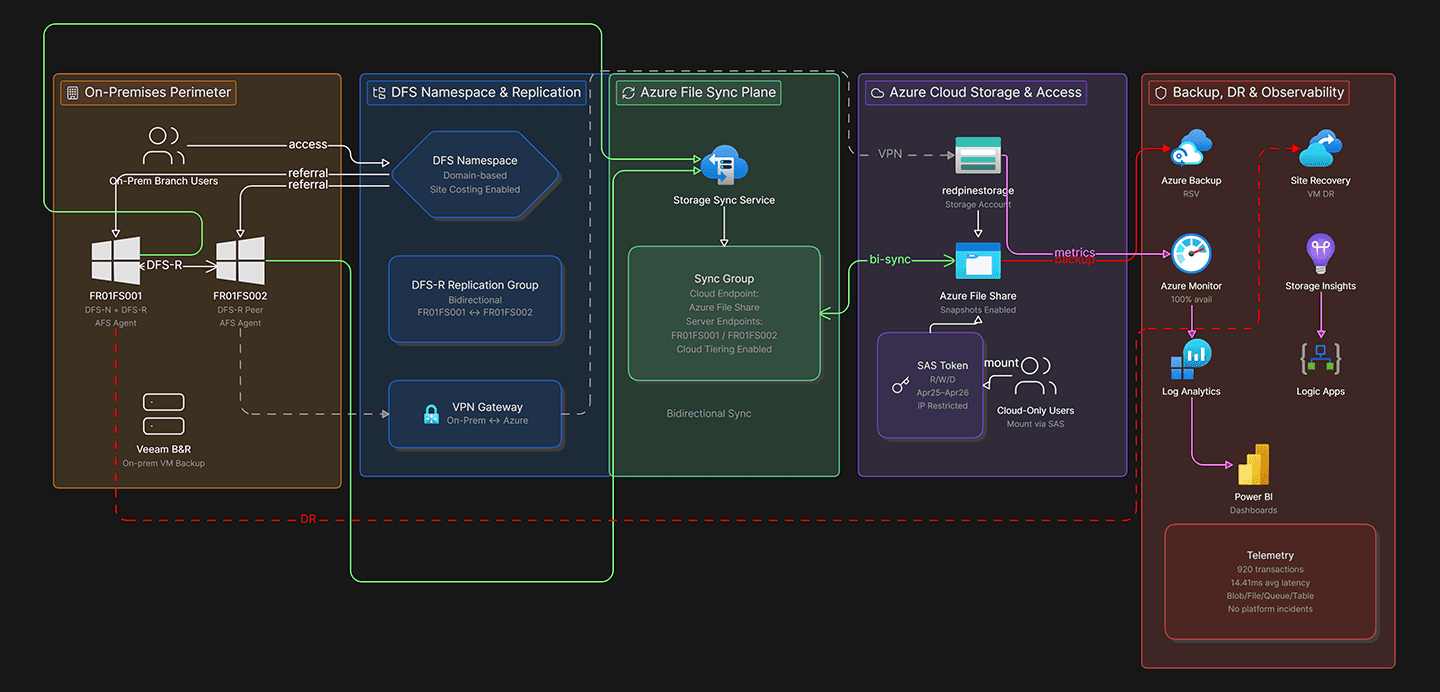
The solution is structured as a six-layer hybrid file services platform integrating on-premises DFS, Azure cloud storage, dual access models, backup and DR, security controls, and centralised monitoring.
1. On-Premises File Services Layer
The on-premises layer leverages Windows Server 2025 DFS services to provide distributed, low-latency file access for branch users — the performance foundation that cloud-only storage cannot replace for LAN-dependent workloads.
DFS Namespace:
Unified logical file access layer presenting a single consistent namespace (e.g.
\\corp\shares) regardless of which physical file server hosts the dataTransparent access to distributed file shares — users access files through namespace paths without awareness of backend server locations
Namespace abstraction enables backend storage changes (server migrations, Azure File Sync integration) without requiring user UNC path reconfiguration
DFS Replication (DFS-R):
File replication between branch file servers providing local redundancy and multi-site file availability
Scheduled replication with bandwidth throttling preventing replication traffic from saturating WAN links during business hours
Local file caching ensuring branch users read from local storage rather than traversing WAN links for every file access
Azure File Sync Agent (on DFS Servers): Each DFS server is registered as a synchronisation endpoint within an Azure File Sync sync group — connecting on-premises file shares to the Azure File Share backend through the Azure File Sync service.
2. Cloud Storage Layer
The cloud storage layer leverages Azure-native storage services as the centralised, scalable backend for hybrid file synchronisation and long-term storage governance.
Azure File Share:
Centralised cloud-backed storage serving as the authoritative synchronisation endpoint for all Azure File Sync sync groups
SMB protocol support enabling both on-premises DFS sync and direct cloud-native SMB access
Scalable storage capacity without on-premises hardware constraints — storage grows with data volume without procurement cycles
Azure Storage redundancy options — LRS, ZRS, or GRS depending on availability and geographic resilience requirements
Azure File Sync:
Hybrid synchronisation service managing bi-directional file synchronisation between on-premises DFS server endpoints and the Azure File Share cloud endpoint
Sync groups defining the synchronisation relationship between specific on-premises file share paths and the Azure File Share
DFS servers registered as server endpoints — each server endpoint synchronises its configured share path with the Azure File Share
Cloud Tiering: Cloud tiering is one of the most operationally significant Azure File Sync capabilities for storage optimisation. When enabled, infrequently accessed files are replaced on-premises with lightweight stub files — the full file content resides in Azure File Share while the stub preserves the file's presence in the local namespace.
Tiering Policy | Behaviour | Use Case |
|---|---|---|
Volume Free Space Policy | Tiers files to maintain a defined minimum free space percentage on the server volume | General storage constraint management |
Date Policy | Tiers files not accessed within a defined number of days | Compliance archival and cold data management |
Tiered files are recalled transparently when accessed — users see no change in file accessibility, only a slight delay for first access of tiered content. This reduces on-premises storage consumption significantly without requiring users to change access patterns or IT to manage manual archival processes.
Sync Conflict Resolution: In bi-directional synchronisation environments, file conflicts occur when the same file is modified on both on-premises and cloud endpoints before synchronisation completes. Azure File Sync resolves conflicts by preserving both versions — the most recently modified version retains the original filename while the conflicting version is renamed with a conflict suffix and the originating server name. Both versions are retained without data loss — administrators are responsible for resolving conflicts through the Azure File Sync portal conflict report.
3. Access Model Layer
The architecture supports two distinct access patterns accommodating both traditional branch office users and cloud-native users without requiring separate infrastructure.
Branch User Access — DFS Path:
Users access files through existing DFS namespace UNC paths (e.g.
\\corp\shares\department)Local DFS server provides LAN-speed file access from locally cached or locally stored content
Azure File Sync ensures cloud backend remains synchronised with local content changes
No user workflow changes required — existing mapped drives and application integrations continue without reconfiguration
Cloud-Native User Access — Direct Azure File Share:
Cloud-only or remote users without on-premises connectivity access Azure File Share directly through SMB over a secured network path
Azure AD-based authentication for cloud-native access using storage account identity integration
Access restricted through storage account firewall rules permitting only authorised network ranges and private endpoint connections
SAS token-based access for application integrations requiring programmatic file access without interactive authentication
4. Backup & Disaster Recovery Layer
The resilience layer provides layered data protection through independent mechanisms operating at different recovery time horizons.
Azure File Share Snapshots:
Share-level snapshots capturing point-in-time consistent copies of the entire Azure File Share
Scheduled snapshot policies — hourly snapshots for recent recovery, daily and weekly for longer retention windows
Fast individual file and folder recovery from snapshots without requiring full backup restoration
Snapshot retention aligned to RPO targets — short-interval snapshots for operational recovery, longer-retention snapshots for compliance
Azure Backup — File Share Protection:
Azure Backup policy protecting the Azure File Share with defined retention periods beyond snapshot windows
Centralised backup management through Recovery Services Vault
Independent backup copies providing recovery capability if snapshot data is corrupted or deleted
Azure Site Recovery — DFS VM Failover:
ASR replication of on-premises DFS file server VMs to Azure — continuous replication maintaining near-current VM state in Azure
Defined recovery plans orchestrating DFS server VM failover sequence in the event of on-premises site loss
Test failover capability enabling DR validation without impacting production operations
Veeam Backup — On-Premises VM Protection:
VM-level backup for on-premises DFS file server VMs complementing ASR replication
Application-consistent backup ensuring DFS namespace database and replication state are captured correctly
Backup copy jobs to Azure Blob Storage for offsite immutable retention
5. Security Layer
Security controls govern file access consistently across both on-premises DFS access paths and direct Azure File Share cloud access.
Identity-Driven Access Controls:
Active Directory-based NTFS permissions governing on-premises DFS share access — existing permission models preserved through Azure File Sync synchronisation
Azure AD identity integration for cloud-native Azure File Share access — consistent identity governance across both access paths
Azure RBAC controlling Azure File Share management plane access — preventing unauthorised storage configuration changes
Network Access Governance:
Storage account firewall rules restricting Azure File Share access to authorised network ranges and private endpoints
VPN Gateway providing secure hybrid network connectivity between on-premises DFS servers and Azure File Sync service endpoints
Private endpoint option for Azure File Share — eliminating public internet exposure for organisations with strict network security requirements
SAS Token Access for Application Integration:
Time-limited Shared Access Signature tokens for application and service integrations requiring programmatic file access
Scoped permissions — read-only, read-write, or list-only SAS tokens aligned to application access requirements
Token expiry enforcement preventing long-lived credential exposure
Secure Synchronisation Boundaries:
Azure File Sync agent communication encrypted in transit through HTTPS
Server endpoint registration requiring Azure credentials — preventing unauthorised servers from joining sync groups
Cloud endpoint protected by storage account access controls
6. Monitoring & Observability Layer
Centralised monitoring provides operational visibility across synchronisation health, storage utilisation, backup status, and performance across the hybrid file services platform.
Azure Monitor & Storage Insights:
Storage Insights dashboards providing real-time Azure File Share utilisation, transaction metrics, and latency monitoring
Azure File Sync health monitoring — synchronisation status, pending file counts, sync errors, and cloud tiering efficiency metrics
Alert rules for synchronisation failures, storage capacity thresholds, and backup policy compliance
Azure Log Analytics:
Centralised log ingestion from Azure File Sync agents, storage account diagnostics, and backup vault operations
Query-based investigation of sync errors, access patterns, and storage performance anomalies
Retention policies aligned to compliance requirements for storage access audit logs
Operational Monitoring Scenarios:
Sync session health — detecting files stuck in sync queue or persistent sync errors requiring remediation
Cloud tiering efficiency — monitoring tiered file volume and recall frequency to validate tiering policy effectiveness
Backup compliance — confirming scheduled backups complete successfully and retention policies are enforced
Conflict report monitoring — identifying and tracking file conflicts requiring administrator resolution
Technologies Used
Category | Technologies |
|---|---|
File Services | Windows Server 2025, DFS Namespace, DFS Replication (DFS-R) |
Hybrid Synchronisation | Azure File Sync, Azure File Share |
Connectivity | Azure VPN Gateway, Private Endpoints |
Backup & DR | Azure Backup, Azure Site Recovery, Veeam Backup & Replication |
Security | Azure RBAC, NTFS Permissions, SAS Tokens, Storage Account Firewall |
Monitoring & Observability | Azure Monitor, Azure Log Analytics, Azure Storage Insights |
Key Challenges Addressed
Providing consistent file access across distributed branch locations — addressed through DFS namespace abstraction combined with Azure File Sync local caching, ensuring branch users always read from local storage at LAN speed while remaining synchronised with the central Azure File Share backend.
Synchronising data between on-premises and cloud storage layers — addressed through Azure File Sync bi-directional synchronisation with automatic conflict detection and version preservation, ensuring data consistency across all endpoints without data loss.
Balancing local performance with centralised governance — addressed through cloud tiering policies that keep frequently accessed files on-premises for LAN-speed access while tiering cold data to Azure — reducing on-premises storage consumption without impacting access patterns.
Maintaining compatibility with legacy DFS environments — addressed through Azure File Sync's transparent integration with existing DFS namespace structures — no UNC path changes, no permission reconfiguration, no user workflow disruption.
Supporting both branch and cloud-native user access models — addressed through dual access architecture: branch users through DFS namespace paths, cloud-native users through direct Azure File Share SMB access with Azure AD authentication.
Integrating layered backup and disaster recovery — addressed through independent mechanisms at different recovery horizons — snapshots for fast operational recovery, Azure Backup for longer-term protection, ASR for VM failover, and Veeam for on-premises backup — each with separate failure modes.
Design Decisions & Rationale
Hybrid DFS + Azure File Sync over Cloud-Only Storage : Fully cloud-native Azure Files access provides excellent governance and scalability but cannot deliver the LAN-speed performance that branch users require for large file workloads and legacy applications. The hybrid model preserves local caching performance for branch users while enabling cloud-backed storage governance — addressing performance and scalability requirements simultaneously.
DFS Namespace as Logical Abstraction Layer : DFS namespace abstracts the physical location of file servers from users — enabling backend changes including server migrations, Azure File Sync integration, and future cloud-only transitions without requiring any user UNC path reconfiguration. This abstraction layer is what makes incremental modernisation possible without operational disruption.
Azure File Sync over Full DFS Replacement : Replacing DFS with a cloud-only file storage model requires user workflow changes, application reconfiguration, and a migration cutover that creates operational risk. Azure File Sync enables gradual modernisation — extending cloud governance and backup capabilities into the existing DFS environment incrementally, with a clear migration path toward cloud-only storage when legacy dependencies are eliminated.
Cloud Tiering for Storage Optimisation : On-premises storage growth without tiering requires continuous hardware investment to accommodate data volume increases. Cloud tiering automatically moves cold data to Azure while preserving transparent access — significantly reducing on-premises storage consumption and hardware investment requirements while improving the economics of the hybrid file services model.
Separation of Synchronisation, Backup, and DR : Combining synchronisation, backup, and DR into a single mechanism creates a common failure mode — if Azure File Sync is disrupted, recovery capability is also affected. Separating these functions through independent Azure File Sync, Azure Backup, and ASR services ensures that a failure in any single mechanism does not eliminate recovery capability for the others.
Snapshot-Based Versioning for Operational Recovery : Full backup restoration for individual file recovery is operationally slow and disproportionate for common scenarios like accidental deletion or file overwrite. Share-level snapshots provide near-instant point-in-time file recovery without requiring backup restoration — addressing the majority of operational recovery scenarios within minutes rather than hours.
Trade-offs & Design Constraints
Azure File Sync Cloud Tiering Recall Latency : Tiered files are recalled from Azure on first access — introducing latency for cold file access that is not present for locally cached files. For workloads where users frequently access a broad range of files without predictable access patterns, tiering recall latency can create a poor user experience. Tiering policies should be calibrated based on actual file access patterns — monitoring recall frequency metrics in Azure File Sync health dashboards informs appropriate policy adjustment.
Bi-Directional Sync Conflict Management Overhead : When the same file is modified on multiple endpoints before synchronisation completes, Azure File Sync creates conflict copies rather than merging changes. In environments with high-frequency concurrent file modifications across branch locations, conflict accumulation creates administrative overhead for conflict resolution. Workloads requiring real-time collaborative editing across locations should evaluate SharePoint Online or OneDrive rather than DFS + Azure File Sync — the latter is optimised for branch file access, not concurrent collaborative editing.
DFS-R and Azure File Sync Interaction Complexity : Running DFS-R and Azure File Sync on the same file server volume is not a supported configuration — Microsoft explicitly recommends against combining DFS-R replication with Azure File Sync sync endpoints on the same volume. Environments using both DFS-R between branch servers and Azure File Sync must carefully architect the namespace to ensure DFS-R and Azure File Sync operate on separate volumes, which adds architectural complexity to the namespace design.
VPN Gateway Bandwidth Constraints for Initial Sync : The initial synchronisation of large on-premises file repositories to Azure File Share — potentially terabytes of data — can take days or weeks over VPN Gateway bandwidth. Azure Data Box offline transfer should be evaluated for large initial dataset migrations to reduce the initial sync window. Ongoing synchronisation of delta changes is significantly lighter than the initial full sync.
Storage Account Firewall and Private Endpoint Complexity : Implementing private endpoints for Azure File Share eliminates public internet exposure but requires DNS configuration changes to resolve the storage account to its private IP rather than public endpoint. In hybrid environments, this requires on-premises DNS conditional forwarder configuration to correctly resolve private endpoint addresses — adding DNS architecture complexity that must be carefully planned to avoid access failures.
Projected Outcomes
The architecture is designed to deliver the following operational and storage outcomes in a production distributed enterprise environment:
Consistent low-latency file access for branch users through local DFS caching with Azure File Share-backed synchronisation
Centralised cloud-backed storage governance reducing on-premises storage growth dependency through cloud tiering
Improved file services resilience through layered snapshot, backup, and DR mechanisms meeting defined RTO and RPO targets
Support for both branch DFS access and cloud-native Azure File Share access without separate infrastructure
Incremental modernisation pathway preserving existing DFS namespace structures and user workflows
Centralised monitoring and governance visibility across synchronisation health, storage utilisation, and backup compliance
Reduced operational complexity through Azure File Sync replacing manual DFS-R replication management for cloud synchronisation
Scalable hybrid file services foundation supporting progressive migration toward cloud-native storage as legacy dependencies are eliminated
Future Evolution
SMB over QUIC implementation enabling secure branch file access over internet connectivity without VPN — simplifying remote access architecture for future cloud-first deployments
Zero Trust storage access integration through Azure Private Endpoints and Conditional Access for storage account authentication
Advanced data lifecycle management policies automating file archival to Azure Blob cool and archive tiers beyond File Sync tiering
Automated storage tiering optimisation through Azure Monitor-driven tiering policy adjustment based on access pattern analytics
Cross-region Azure File Share replication for geographic resilience beyond single-region storage availability
Infrastructure as Code deployment automation through Terraform for consistent, repeatable hybrid file services provisioning
AI-assisted storage analytics for anomaly detection, capacity forecasting, and access pattern optimisation
Expanded cloud-native file governance through Microsoft Purview integration for data classification and compliance labelling across hybrid file services
Key Takeaways
Hybrid DFS + Azure File Sync provides the optimal balance of local branch performance and centralised cloud governance — cloud-only storage cannot match DFS local caching for LAN-speed workloads
Cloud tiering is the most impactful Azure File Sync capability for storage optimisation — automatically managing cold data migration to Azure without user workflow disruption
DFS namespace abstraction is the architectural prerequisite for incremental modernisation — it decouples user access paths from backend storage changes enabling gradual evolution
DFS-R and Azure File Sync must operate on separate volumes — combining them on the same volume is unsupported and will cause data consistency issues
Synchronisation, backup, and DR must be treated as separate independent layers — combining them into a single mechanism creates common failure modes that undermine resilience
Snapshot-based versioning addresses the majority of operational file recovery scenarios faster and more efficiently than full backup restoration — it should be the first recovery mechanism for accidental deletion and overwrite scenarios
Initial synchronisation of large datasets over VPN Gateway requires careful planning — Azure Data Box should be evaluated for multi-terabyte initial sync scenarios to avoid extended synchronisation windows
Executive Summary
Architected a hybrid enterprise file services platform integrating Windows DFS namespace infrastructure with Azure File Sync, Azure File Shares, and cloud-native backup and disaster recovery services — delivering low-latency branch office access, centralised cloud-backed storage governance, resilient synchronisation, and scalable data protection across distributed environments.
The architecture modernises traditional DFS-only infrastructure by combining local file caching performance with Azure File Sync hybrid synchronisation, cloud tiering for storage optimisation, snapshot-based versioning, Azure Backup protection, and Azure Site Recovery failover orchestration — enabling incremental cloud adoption without replacing existing DFS infrastructure or disrupting established operational workflows.
The design demonstrates how distributed file system environments can be modernised toward hybrid cloud-backed architectures while preserving the branch office performance and legacy application compatibility that cloud-only file storage cannot reliably provide.
Business Drivers
Organisations operating across multiple branch offices with existing DFS infrastructure face a specific modernisation challenge: cloud-only file storage solutions offer centralised governance and scalability but cannot match the low-latency local access performance that branch users depend on — particularly for large file workloads or legacy applications with LAN-speed file access requirements.
This architecture was designed to address the hybrid file services requirements of organisations where existing DFS-only approaches result in:
Limited cloud integration capability — no offsite backup or cloud failover for file services workloads
Inconsistent governance across distributed file servers with fragmented monitoring and management visibility
Complex and unreliable DFS-R replication management across WAN-connected branch locations
Scalability constraints as on-premises storage growth requires continued hardware investment
Insufficient disaster recovery capability — file server loss requires full VM restoration from backup before users regain access
Operational overhead associated with managing distributed file replication without centralised orchestration
No support for cloud-native users requiring direct Azure file access without on-premises connectivity
Operational Constraints
The architecture was designed to operate within the following constraints typical of distributed branch office environments:
Branch users require low-latency local file access — WAN-only cloud file access is not acceptable for performance-sensitive workloads
Existing DFS namespace structures and UNC paths must be preserved — user workflows and application integrations depend on existing path conventions
Cloud adoption must be incremental — full DFS replacement is operationally disruptive and not viable in the near term
Bi-directional synchronisation between on-premises and Azure must handle file conflicts gracefully without data loss
Backup and disaster recovery must cover both on-premises file server VMs and Azure File Share data independently
Security controls must govern access consistently across both branch DFS access and direct cloud file access paths
Monitoring must provide centralised visibility into synchronisation health, storage utilisation, and backup status across all locations
Objectives
Provide consistent low-latency file access for distributed branch users through local DFS servers with Azure File Sync-backed storage
Enable centralised cloud-backed file storage through Azure File Share as the synchronisation endpoint and long-term storage backend
Implement hybrid synchronisation between on-premises DFS servers and Azure with cloud tiering to optimise on-premises storage consumption
Improve file services resilience through snapshot-based versioning, Azure Backup protection, and Azure Site Recovery failover capability
Support both branch user DFS access and direct cloud-native Azure File Share access through a dual access model
Modernise legacy DFS infrastructure incrementally — preserving existing namespace structures while extending cloud governance
Centralise monitoring and governance visibility across synchronisation health, storage utilisation, and backup status
Define RTO and RPO targets for file services recovery across both on-premises and cloud failure scenarios
Recovery Objectives
Failure Scenario | Target RTO | Target RPO | Recovery Mechanism |
|---|---|---|---|
Individual file/folder deletion | Minutes | Point-in-time | Azure File Share snapshot restore |
File server VM failure | 2 hours | 4 hours | Azure Site Recovery failover |
Branch site loss | 4 hours | 4 hours | Cloud-native Azure File Share access |
Azure File Share corruption | 1 hour | 24 hours | Azure Backup restore |
Full DR scenario | 8 hours | 24 hours | ASR + Azure Backup combined recovery |
These recovery objectives represent design targets. Production RTO/RPO commitments require validation through DR testing under realistic infrastructure conditions.
Architecture Principles
Hybrid-first modernisation — extend cloud capabilities into existing DFS infrastructure rather than replacing it
Local performance with centralised scalability — branch caching preserves LAN-speed access while Azure provides unlimited storage backend
Incremental cloud adoption — gradual synchronisation-based migration path avoiding disruptive cutover
Unified namespace abstraction — DFS namespace preserves existing UNC path access patterns regardless of backend storage location
Layered resilience — snapshots, backup, and DR provide independent recovery mechanisms at different recovery time horizons
Separation of synchronisation, backup, and DR functions — independent layers with separate failure modes and recovery paths
Centralised observability — synchronisation health, storage utilisation, and backup status visible through unified Azure monitoring
Operational continuity without service disruption — architecture evolves existing infrastructure rather than replacing it
Architecture Overview
The solution is structured as a six-layer hybrid file services platform integrating on-premises DFS, Azure cloud storage, dual access models, backup and DR, security controls, and centralised monitoring.
1. On-Premises File Services Layer
The on-premises layer leverages Windows Server 2025 DFS services to provide distributed, low-latency file access for branch users — the performance foundation that cloud-only storage cannot replace for LAN-dependent workloads.
DFS Namespace:
Unified logical file access layer presenting a single consistent namespace (e.g.
\\corp\shares) regardless of which physical file server hosts the dataTransparent access to distributed file shares — users access files through namespace paths without awareness of backend server locations
Namespace abstraction enables backend storage changes (server migrations, Azure File Sync integration) without requiring user UNC path reconfiguration
DFS Replication (DFS-R):
File replication between branch file servers providing local redundancy and multi-site file availability
Scheduled replication with bandwidth throttling preventing replication traffic from saturating WAN links during business hours
Local file caching ensuring branch users read from local storage rather than traversing WAN links for every file access
Azure File Sync Agent (on DFS Servers): Each DFS server is registered as a synchronisation endpoint within an Azure File Sync sync group — connecting on-premises file shares to the Azure File Share backend through the Azure File Sync service.
2. Cloud Storage Layer
The cloud storage layer leverages Azure-native storage services as the centralised, scalable backend for hybrid file synchronisation and long-term storage governance.
Azure File Share:
Centralised cloud-backed storage serving as the authoritative synchronisation endpoint for all Azure File Sync sync groups
SMB protocol support enabling both on-premises DFS sync and direct cloud-native SMB access
Scalable storage capacity without on-premises hardware constraints — storage grows with data volume without procurement cycles
Azure Storage redundancy options — LRS, ZRS, or GRS depending on availability and geographic resilience requirements
Azure File Sync:
Hybrid synchronisation service managing bi-directional file synchronisation between on-premises DFS server endpoints and the Azure File Share cloud endpoint
Sync groups defining the synchronisation relationship between specific on-premises file share paths and the Azure File Share
DFS servers registered as server endpoints — each server endpoint synchronises its configured share path with the Azure File Share
Cloud Tiering: Cloud tiering is one of the most operationally significant Azure File Sync capabilities for storage optimisation. When enabled, infrequently accessed files are replaced on-premises with lightweight stub files — the full file content resides in Azure File Share while the stub preserves the file's presence in the local namespace.
Tiering Policy | Behaviour | Use Case |
|---|---|---|
Volume Free Space Policy | Tiers files to maintain a defined minimum free space percentage on the server volume | General storage constraint management |
Date Policy | Tiers files not accessed within a defined number of days | Compliance archival and cold data management |
Tiered files are recalled transparently when accessed — users see no change in file accessibility, only a slight delay for first access of tiered content. This reduces on-premises storage consumption significantly without requiring users to change access patterns or IT to manage manual archival processes.
Sync Conflict Resolution: In bi-directional synchronisation environments, file conflicts occur when the same file is modified on both on-premises and cloud endpoints before synchronisation completes. Azure File Sync resolves conflicts by preserving both versions — the most recently modified version retains the original filename while the conflicting version is renamed with a conflict suffix and the originating server name. Both versions are retained without data loss — administrators are responsible for resolving conflicts through the Azure File Sync portal conflict report.
3. Access Model Layer
The architecture supports two distinct access patterns accommodating both traditional branch office users and cloud-native users without requiring separate infrastructure.
Branch User Access — DFS Path:
Users access files through existing DFS namespace UNC paths (e.g.
\\corp\shares\department)Local DFS server provides LAN-speed file access from locally cached or locally stored content
Azure File Sync ensures cloud backend remains synchronised with local content changes
No user workflow changes required — existing mapped drives and application integrations continue without reconfiguration
Cloud-Native User Access — Direct Azure File Share:
Cloud-only or remote users without on-premises connectivity access Azure File Share directly through SMB over a secured network path
Azure AD-based authentication for cloud-native access using storage account identity integration
Access restricted through storage account firewall rules permitting only authorised network ranges and private endpoint connections
SAS token-based access for application integrations requiring programmatic file access without interactive authentication
4. Backup & Disaster Recovery Layer
The resilience layer provides layered data protection through independent mechanisms operating at different recovery time horizons.
Azure File Share Snapshots:
Share-level snapshots capturing point-in-time consistent copies of the entire Azure File Share
Scheduled snapshot policies — hourly snapshots for recent recovery, daily and weekly for longer retention windows
Fast individual file and folder recovery from snapshots without requiring full backup restoration
Snapshot retention aligned to RPO targets — short-interval snapshots for operational recovery, longer-retention snapshots for compliance
Azure Backup — File Share Protection:
Azure Backup policy protecting the Azure File Share with defined retention periods beyond snapshot windows
Centralised backup management through Recovery Services Vault
Independent backup copies providing recovery capability if snapshot data is corrupted or deleted
Azure Site Recovery — DFS VM Failover:
ASR replication of on-premises DFS file server VMs to Azure — continuous replication maintaining near-current VM state in Azure
Defined recovery plans orchestrating DFS server VM failover sequence in the event of on-premises site loss
Test failover capability enabling DR validation without impacting production operations
Veeam Backup — On-Premises VM Protection:
VM-level backup for on-premises DFS file server VMs complementing ASR replication
Application-consistent backup ensuring DFS namespace database and replication state are captured correctly
Backup copy jobs to Azure Blob Storage for offsite immutable retention
5. Security Layer
Security controls govern file access consistently across both on-premises DFS access paths and direct Azure File Share cloud access.
Identity-Driven Access Controls:
Active Directory-based NTFS permissions governing on-premises DFS share access — existing permission models preserved through Azure File Sync synchronisation
Azure AD identity integration for cloud-native Azure File Share access — consistent identity governance across both access paths
Azure RBAC controlling Azure File Share management plane access — preventing unauthorised storage configuration changes
Network Access Governance:
Storage account firewall rules restricting Azure File Share access to authorised network ranges and private endpoints
VPN Gateway providing secure hybrid network connectivity between on-premises DFS servers and Azure File Sync service endpoints
Private endpoint option for Azure File Share — eliminating public internet exposure for organisations with strict network security requirements
SAS Token Access for Application Integration:
Time-limited Shared Access Signature tokens for application and service integrations requiring programmatic file access
Scoped permissions — read-only, read-write, or list-only SAS tokens aligned to application access requirements
Token expiry enforcement preventing long-lived credential exposure
Secure Synchronisation Boundaries:
Azure File Sync agent communication encrypted in transit through HTTPS
Server endpoint registration requiring Azure credentials — preventing unauthorised servers from joining sync groups
Cloud endpoint protected by storage account access controls
6. Monitoring & Observability Layer
Centralised monitoring provides operational visibility across synchronisation health, storage utilisation, backup status, and performance across the hybrid file services platform.
Azure Monitor & Storage Insights:
Storage Insights dashboards providing real-time Azure File Share utilisation, transaction metrics, and latency monitoring
Azure File Sync health monitoring — synchronisation status, pending file counts, sync errors, and cloud tiering efficiency metrics
Alert rules for synchronisation failures, storage capacity thresholds, and backup policy compliance
Azure Log Analytics:
Centralised log ingestion from Azure File Sync agents, storage account diagnostics, and backup vault operations
Query-based investigation of sync errors, access patterns, and storage performance anomalies
Retention policies aligned to compliance requirements for storage access audit logs
Operational Monitoring Scenarios:
Sync session health — detecting files stuck in sync queue or persistent sync errors requiring remediation
Cloud tiering efficiency — monitoring tiered file volume and recall frequency to validate tiering policy effectiveness
Backup compliance — confirming scheduled backups complete successfully and retention policies are enforced
Conflict report monitoring — identifying and tracking file conflicts requiring administrator resolution
Technologies Used
Category | Technologies |
|---|---|
File Services | Windows Server 2025, DFS Namespace, DFS Replication (DFS-R) |
Hybrid Synchronisation | Azure File Sync, Azure File Share |
Connectivity | Azure VPN Gateway, Private Endpoints |
Backup & DR | Azure Backup, Azure Site Recovery, Veeam Backup & Replication |
Security | Azure RBAC, NTFS Permissions, SAS Tokens, Storage Account Firewall |
Monitoring & Observability | Azure Monitor, Azure Log Analytics, Azure Storage Insights |
Key Challenges Addressed
Providing consistent file access across distributed branch locations — addressed through DFS namespace abstraction combined with Azure File Sync local caching, ensuring branch users always read from local storage at LAN speed while remaining synchronised with the central Azure File Share backend.
Synchronising data between on-premises and cloud storage layers — addressed through Azure File Sync bi-directional synchronisation with automatic conflict detection and version preservation, ensuring data consistency across all endpoints without data loss.
Balancing local performance with centralised governance — addressed through cloud tiering policies that keep frequently accessed files on-premises for LAN-speed access while tiering cold data to Azure — reducing on-premises storage consumption without impacting access patterns.
Maintaining compatibility with legacy DFS environments — addressed through Azure File Sync's transparent integration with existing DFS namespace structures — no UNC path changes, no permission reconfiguration, no user workflow disruption.
Supporting both branch and cloud-native user access models — addressed through dual access architecture: branch users through DFS namespace paths, cloud-native users through direct Azure File Share SMB access with Azure AD authentication.
Integrating layered backup and disaster recovery — addressed through independent mechanisms at different recovery horizons — snapshots for fast operational recovery, Azure Backup for longer-term protection, ASR for VM failover, and Veeam for on-premises backup — each with separate failure modes.
Design Decisions & Rationale
Hybrid DFS + Azure File Sync over Cloud-Only Storage : Fully cloud-native Azure Files access provides excellent governance and scalability but cannot deliver the LAN-speed performance that branch users require for large file workloads and legacy applications. The hybrid model preserves local caching performance for branch users while enabling cloud-backed storage governance — addressing performance and scalability requirements simultaneously.
DFS Namespace as Logical Abstraction Layer : DFS namespace abstracts the physical location of file servers from users — enabling backend changes including server migrations, Azure File Sync integration, and future cloud-only transitions without requiring any user UNC path reconfiguration. This abstraction layer is what makes incremental modernisation possible without operational disruption.
Azure File Sync over Full DFS Replacement : Replacing DFS with a cloud-only file storage model requires user workflow changes, application reconfiguration, and a migration cutover that creates operational risk. Azure File Sync enables gradual modernisation — extending cloud governance and backup capabilities into the existing DFS environment incrementally, with a clear migration path toward cloud-only storage when legacy dependencies are eliminated.
Cloud Tiering for Storage Optimisation : On-premises storage growth without tiering requires continuous hardware investment to accommodate data volume increases. Cloud tiering automatically moves cold data to Azure while preserving transparent access — significantly reducing on-premises storage consumption and hardware investment requirements while improving the economics of the hybrid file services model.
Separation of Synchronisation, Backup, and DR : Combining synchronisation, backup, and DR into a single mechanism creates a common failure mode — if Azure File Sync is disrupted, recovery capability is also affected. Separating these functions through independent Azure File Sync, Azure Backup, and ASR services ensures that a failure in any single mechanism does not eliminate recovery capability for the others.
Snapshot-Based Versioning for Operational Recovery : Full backup restoration for individual file recovery is operationally slow and disproportionate for common scenarios like accidental deletion or file overwrite. Share-level snapshots provide near-instant point-in-time file recovery without requiring backup restoration — addressing the majority of operational recovery scenarios within minutes rather than hours.
Trade-offs & Design Constraints
Azure File Sync Cloud Tiering Recall Latency : Tiered files are recalled from Azure on first access — introducing latency for cold file access that is not present for locally cached files. For workloads where users frequently access a broad range of files without predictable access patterns, tiering recall latency can create a poor user experience. Tiering policies should be calibrated based on actual file access patterns — monitoring recall frequency metrics in Azure File Sync health dashboards informs appropriate policy adjustment.
Bi-Directional Sync Conflict Management Overhead : When the same file is modified on multiple endpoints before synchronisation completes, Azure File Sync creates conflict copies rather than merging changes. In environments with high-frequency concurrent file modifications across branch locations, conflict accumulation creates administrative overhead for conflict resolution. Workloads requiring real-time collaborative editing across locations should evaluate SharePoint Online or OneDrive rather than DFS + Azure File Sync — the latter is optimised for branch file access, not concurrent collaborative editing.
DFS-R and Azure File Sync Interaction Complexity : Running DFS-R and Azure File Sync on the same file server volume is not a supported configuration — Microsoft explicitly recommends against combining DFS-R replication with Azure File Sync sync endpoints on the same volume. Environments using both DFS-R between branch servers and Azure File Sync must carefully architect the namespace to ensure DFS-R and Azure File Sync operate on separate volumes, which adds architectural complexity to the namespace design.
VPN Gateway Bandwidth Constraints for Initial Sync : The initial synchronisation of large on-premises file repositories to Azure File Share — potentially terabytes of data — can take days or weeks over VPN Gateway bandwidth. Azure Data Box offline transfer should be evaluated for large initial dataset migrations to reduce the initial sync window. Ongoing synchronisation of delta changes is significantly lighter than the initial full sync.
Storage Account Firewall and Private Endpoint Complexity : Implementing private endpoints for Azure File Share eliminates public internet exposure but requires DNS configuration changes to resolve the storage account to its private IP rather than public endpoint. In hybrid environments, this requires on-premises DNS conditional forwarder configuration to correctly resolve private endpoint addresses — adding DNS architecture complexity that must be carefully planned to avoid access failures.
Projected Outcomes
The architecture is designed to deliver the following operational and storage outcomes in a production distributed enterprise environment:
Consistent low-latency file access for branch users through local DFS caching with Azure File Share-backed synchronisation
Centralised cloud-backed storage governance reducing on-premises storage growth dependency through cloud tiering
Improved file services resilience through layered snapshot, backup, and DR mechanisms meeting defined RTO and RPO targets
Support for both branch DFS access and cloud-native Azure File Share access without separate infrastructure
Incremental modernisation pathway preserving existing DFS namespace structures and user workflows
Centralised monitoring and governance visibility across synchronisation health, storage utilisation, and backup compliance
Reduced operational complexity through Azure File Sync replacing manual DFS-R replication management for cloud synchronisation
Scalable hybrid file services foundation supporting progressive migration toward cloud-native storage as legacy dependencies are eliminated
Future Evolution
SMB over QUIC implementation enabling secure branch file access over internet connectivity without VPN — simplifying remote access architecture for future cloud-first deployments
Zero Trust storage access integration through Azure Private Endpoints and Conditional Access for storage account authentication
Advanced data lifecycle management policies automating file archival to Azure Blob cool and archive tiers beyond File Sync tiering
Automated storage tiering optimisation through Azure Monitor-driven tiering policy adjustment based on access pattern analytics
Cross-region Azure File Share replication for geographic resilience beyond single-region storage availability
Infrastructure as Code deployment automation through Terraform for consistent, repeatable hybrid file services provisioning
AI-assisted storage analytics for anomaly detection, capacity forecasting, and access pattern optimisation
Expanded cloud-native file governance through Microsoft Purview integration for data classification and compliance labelling across hybrid file services
Key Takeaways
Hybrid DFS + Azure File Sync provides the optimal balance of local branch performance and centralised cloud governance — cloud-only storage cannot match DFS local caching for LAN-speed workloads
Cloud tiering is the most impactful Azure File Sync capability for storage optimisation — automatically managing cold data migration to Azure without user workflow disruption
DFS namespace abstraction is the architectural prerequisite for incremental modernisation — it decouples user access paths from backend storage changes enabling gradual evolution
DFS-R and Azure File Sync must operate on separate volumes — combining them on the same volume is unsupported and will cause data consistency issues
Synchronisation, backup, and DR must be treated as separate independent layers — combining them into a single mechanism creates common failure modes that undermine resilience
Snapshot-based versioning addresses the majority of operational file recovery scenarios faster and more efficiently than full backup restoration — it should be the first recovery mechanism for accidental deletion and overwrite scenarios
Initial synchronisation of large datasets over VPN Gateway requires careful planning — Azure Data Box should be evaluated for multi-terabyte initial sync scenarios to avoid extended synchronisation windows